FastAPIでX-Forwarded-Hostを用いたリダイレクト
ソースを見てみたい人向け
https://gist.github.com/attakei/6b308a2a7949746a8027fc0258f1de1c
なにこれ
FastAPI 用にX-Forwarded-Host ヘッダーがFastAPI 用とはStarlette だけなので、Starlette 派生なら
何ができるの?
FastAPI が
コードを書いてみた背景とか
Firebase + Cloud Run の挙動
このFirebase Hosting + Cloud Run のCloud Run サービスから

Cloud Run はFirebase からCloud Run へのFirebase のX-Forwarded-Host ヘッダー経由で
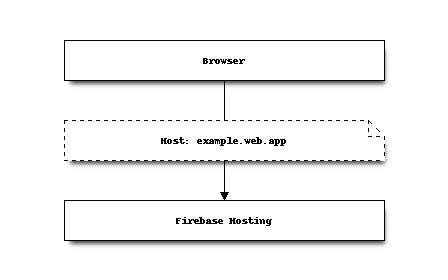
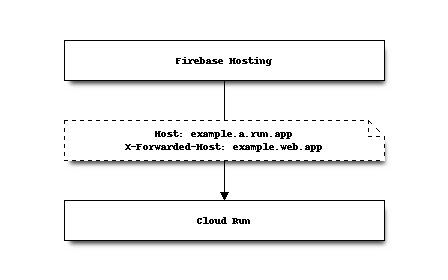
FastAPIの Slashes redirection
FastAPI のAPIRouter クラスがAPIRouter のredirect_slashes が
これは、True なら/ と/ 末尾が/ スラッシュを
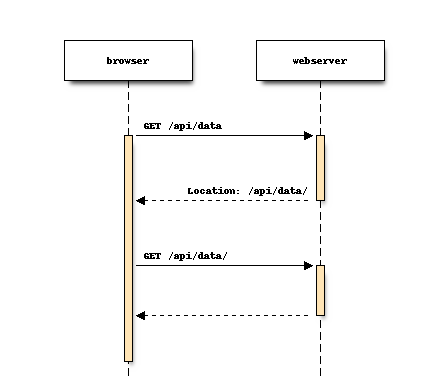
このHost ヘッダーを
組み合わさるとどうなるか
上記2点がHost ヘッダーはCloud Run 自身の
「Firebaseの
と
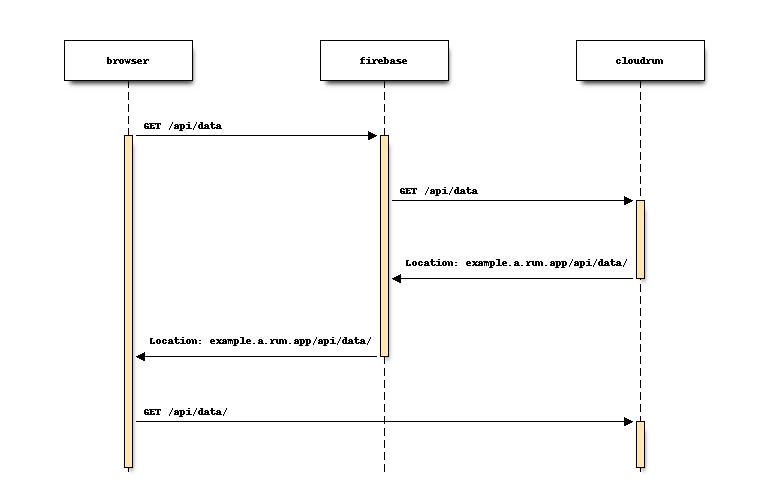
「なんの
中身的には、
# flake8: noqa


class Router:
    """starlette.routing.Router から必要最低限のとこだけ抜粋"""

    async def __call__(self, scope: Scope, receive: Receive, send: Send) -> None:
        # 前略

        if scope["type"] == "http" and self.redirect_slashes and scope["path"] != "/":
            # リクエストパスが / で終わらない時に、リダイレクト可能性があるので / 付きのデータを用意
            redirect_scope = dict(scope)
            if scope["path"].endswith("/"):
                redirect_scope["path"] = redirect_scope["path"].rstrip("/")
            else:
                redirect_scope["path"] = redirect_scope["path"] + "/"

            # ルーティング情報からリダイレクト先とマッチする情報があるか探し、
            # 見つかったら、リダイレクトレスポンスを返してしまうs
            for route in self.routes:
                match, child_scope = route.matches(redirect_scope)
                if match != Match.NONE:
                    redirect_url = URL(scope=redirect_scope)  # <= この中身がhostしかみない
                    response = RedirectResponse(url=str(redirect_url))
                    await response(scope, receive, send)
                    return
        # 後略
どう対処したか
https://gist.github.com/attakei/6b308a2a7949746a8027fc0258f1de1c
ミドルウェアをX-Forwarded-Host ヘッダーがHost ヘッダーの
 1class ForwardedHostMiddleware:
 2    def remap_headers(self, src: Headers, before: bytes, after: bytes) -> Headers:
 3        """元のヘッダーリストから、
 4        - 無関係なものはそのままコピーして
 5        - 置換対象は一旦退避して
 6        - 結果に応じて再追記する
 7        """
 8        remapped = []
 9        before_value = None
10        after_value = None
11        for header in src:
12            k, v = header
13            if k == before:
14                before_value = v
15                continue
16            elif k == after:
17                after_value = v
18                continue
19            remapped.append(header)
20        if after_value:
21            remapped.append((before, after_value))
22        elif before_value:
23            remapped.append((before, before_value))
24        return remapped
弊害はあるか?
他にHost ヘッダを
ただHost ヘッダーに